Sign up for Outage Notifications via the WREC Mobile App - Click here to learn more!

Click here to learn more about Beat The Peak
Office Hours are 8:00 am - 5:00 pm Monday - Friday, Excluding Holidays.

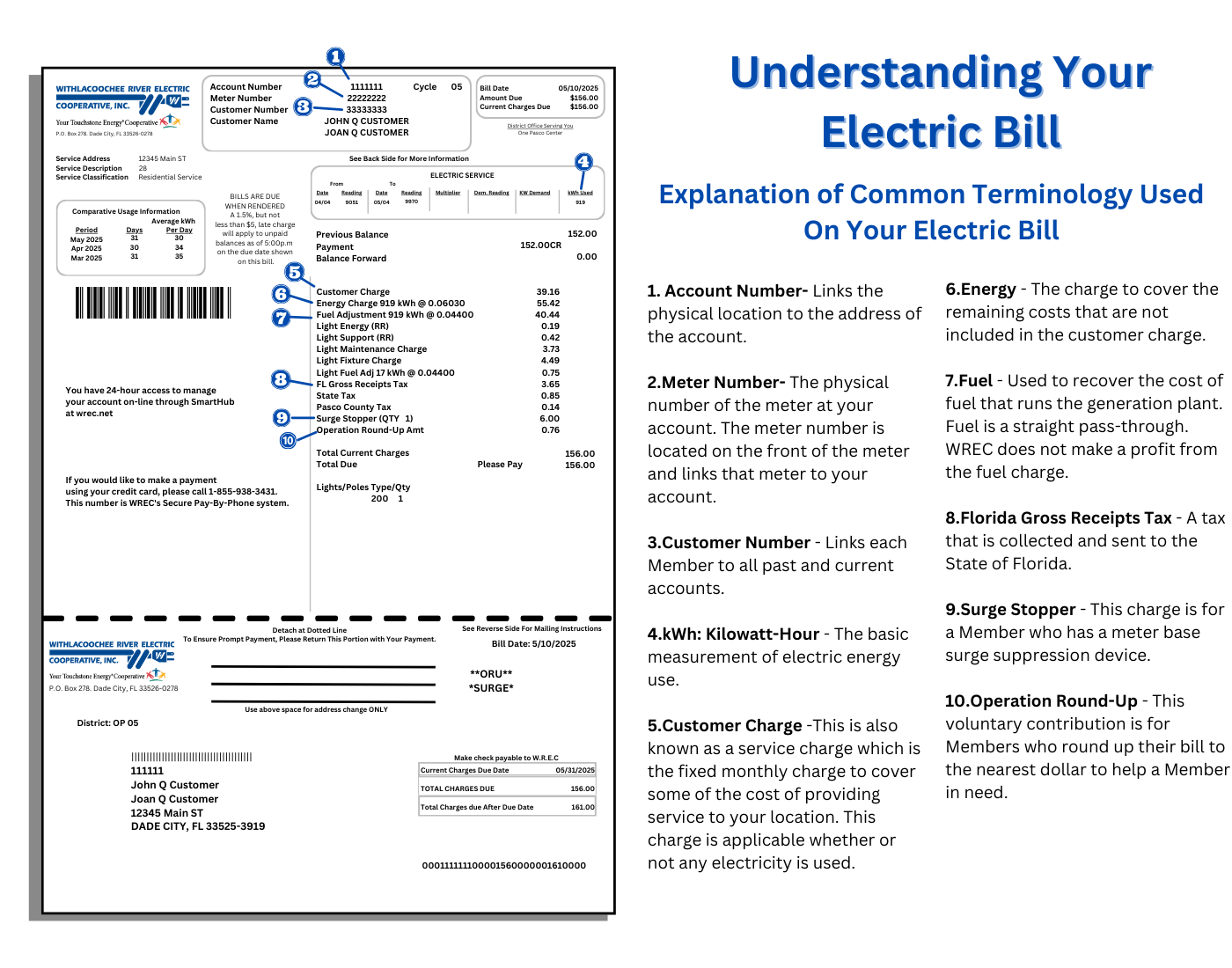
Want the most efficient way to manage your account? Then download the WREC mobile app to manage your account anytime, anywhere. Make payments, track usage, report outages, enroll in programs, and more—all from one easy tool. Stay informed, save time and money, and take full control of your account with the right information at the right time. Download links available below.

⚠️ Important: Only WREC offices and the methods above are authorized. Payments made through third‑party vendors may be delayed, leading to extra fees or service disconnection.

Sign up for Electronic Funds Transfer (EFT) to set up automatic payments from your checking or savings account. The easiest way to enroll is by logging in at wrec.net or through the WREC mobile app. Select Bill & Pay → Auto Pay Program, accept the terms, and enter your account details. You can also print and mail an EFT Authorization Form with a voided check or deposit slip to your local WREC office.